IPv6 Compatibility Checker - Test Website, Name Server & Mail Server IPv6
Use this free IPv6 compatibility checker to test any domain's IPv6 readiness in seconds. Enter a domain name and the tool runs an IPv6 DNS check against the domain's live records: it verifies AAAA records for the website, then tests whether the name servers and mail servers also support IPv6, giving you a complete infrastructure picture in one lookup.
IPv6 adoption is no longer a distant infrastructure concern — it is a present-day operational reality. Google's public statistics show IPv6 traffic consistently above 45% of requests globally, with mobile networks in countries like China, India, and the United States running majority IPv6 traffic. As ISPs complete their transition away from IPv4, domains that have not published AAAA records will become harder for IPv6-only clients to reach, and the window to address this is shrinking.
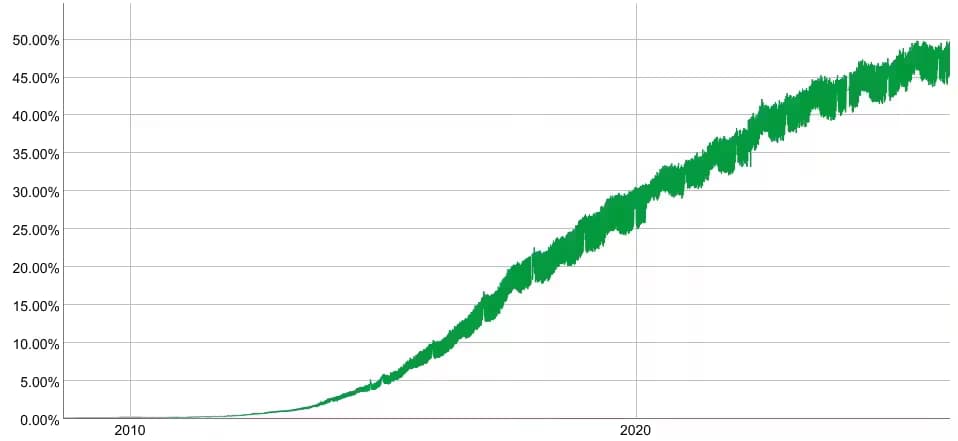
Most IPv6 test tools on the web check whether your internet connection supports IPv6. This tool does something different: it checks whether a domain's DNS infrastructure is IPv6-ready. That distinction matters if you are a developer, sysadmin, or website owner trying to verify that your domain, not just your ISP, is ready for IPv6 traffic.
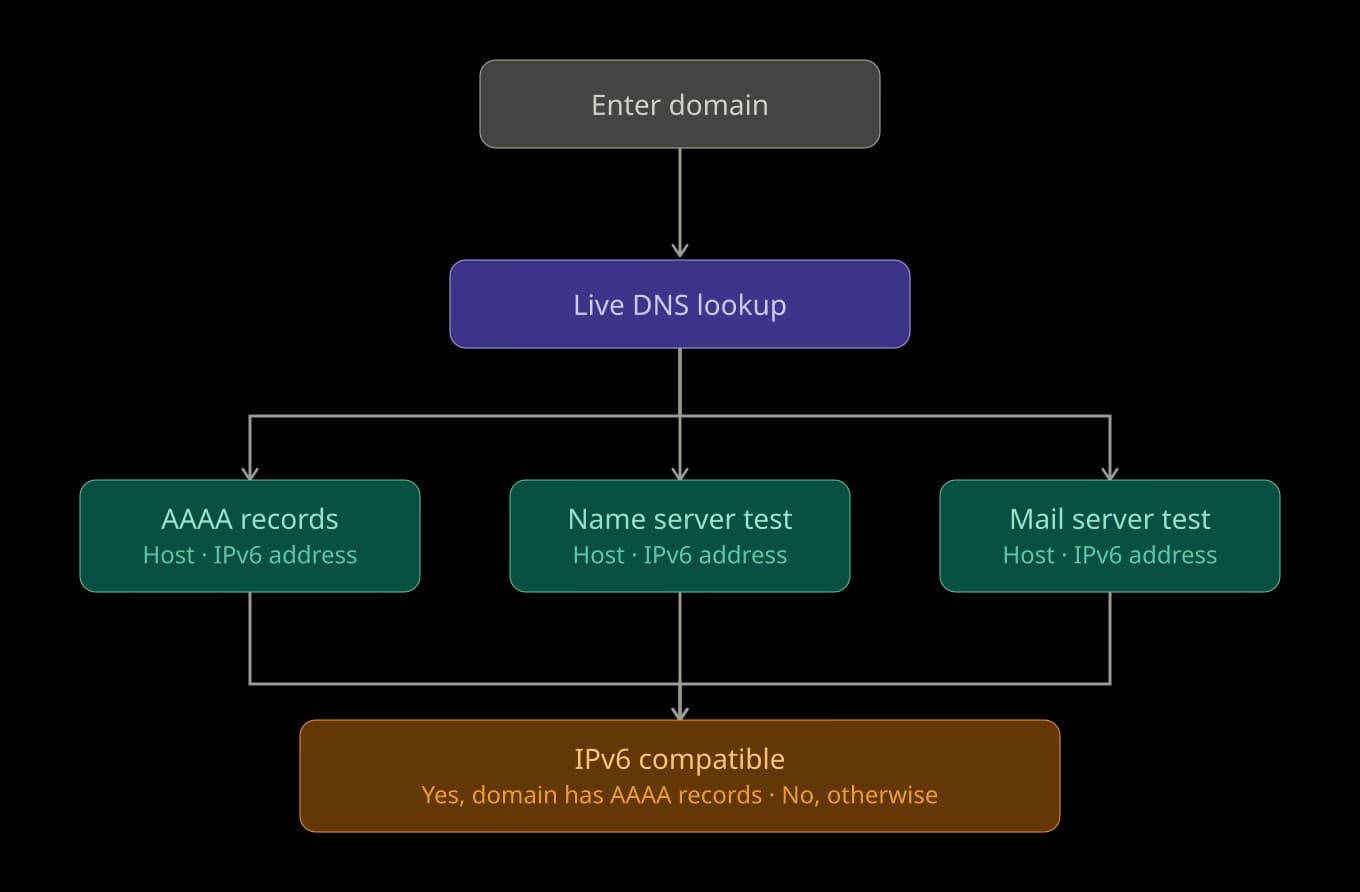
This tool performs the following three live DNS lookups in one request:
- It queries the domain's authoritative nameservers for AAAA records, the DNS record type that maps a hostname to an IPv6 address. An AAAA record lookup returning at least one result is the primary signal of IPv6 support and sets the overall "IPv6 Compatible: Yes" verdict.
- It queries whether the domain's authoritative name servers publish their own AAAA records. This matters because IPv6-only DNS resolvers need to be able to reach the nameserver layer over IPv6 to perform lookups at all.
- It queries the AAAA records of the domain's MX mail servers, which determines whether inbound and outbound email can flow over IPv6 connections.
dig, nslookup, or manual record parsing. The tool is free to use without a signup, works for any publicly resolvable domain including subdomains, and pulls live DNS data on every query rather than serving cached results. For automated IPv6 testing at scale, the same lookups are available programmatically through the APIFreaks DNS Lookup API.What you get from this tool
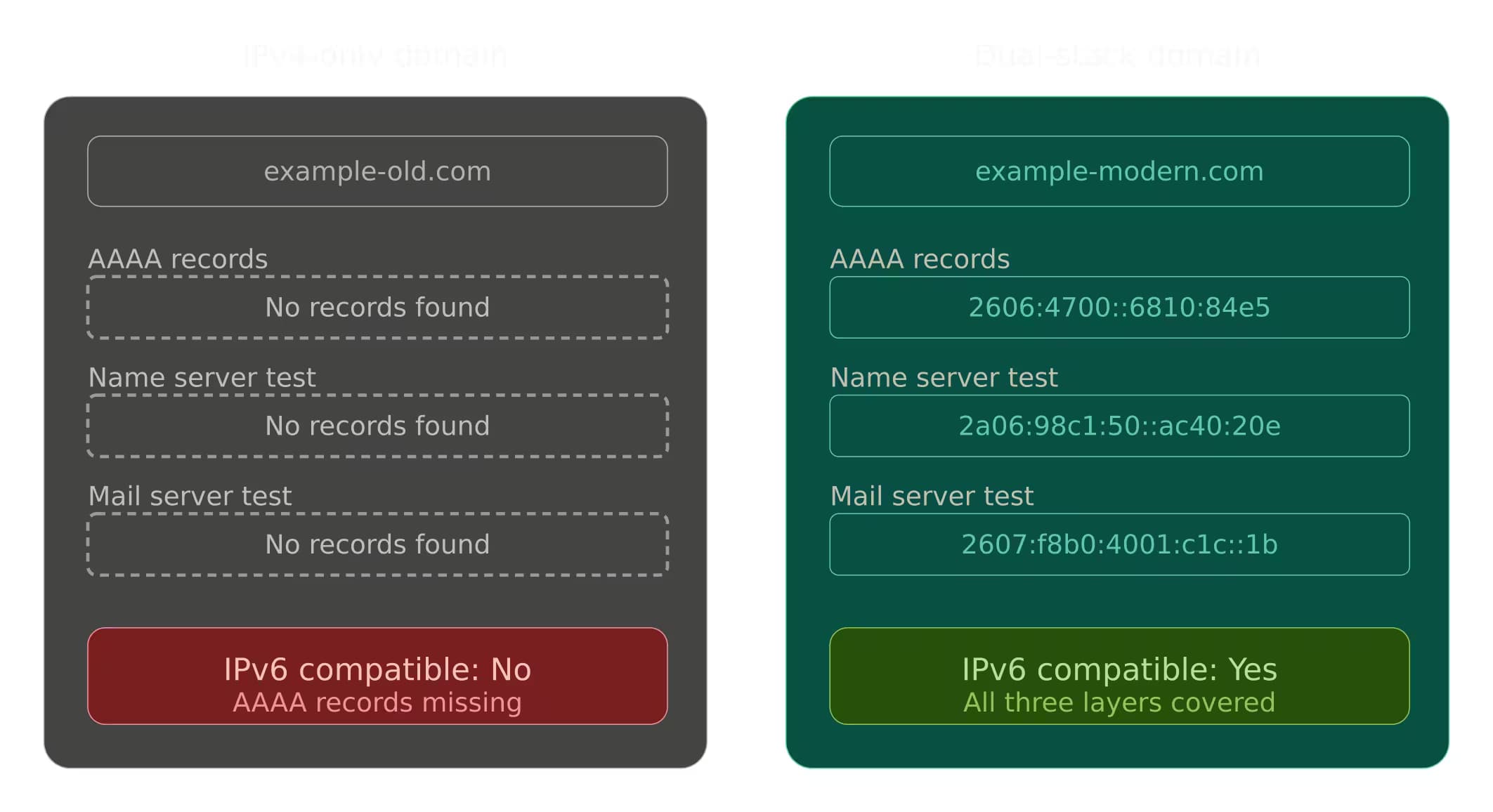
Run a domain through this checker and you get four outputs:
- IPv6 Compatible Verdict: A "Yes" or "No" at the top of the results. "Yes" means the domain has at least one AAAA record in DNS and is reachable over IPv6. "No" means the domain is currently IPv4-only. This is the fastest possible IPv6 support check for a domain — the answer to “does this website support IPv6” without running a dig AAAA command yourself.
- AAAA Records Table (Host & IPv6 Address): Every IPv6 address published directly for the domain, pulled from its authoritative nameservers. Multiple rows here typically indicate load balancing, CDN routing, or redundant endpoints. An empty table confirms the domain has no AAAA records - which is an actionable finding that tells you exactly what needs to be added.
- Name Server Test Table (Host & IPv6 Address): The IPv6 addresses of the domain's authoritative name servers, if any exist. IPv6-capable nameservers matter because the resolvers on pure IPv6 networks need to reach the NS (nameserver) layer over IPv6 to perform DNS lookups at all. An empty table means the nameservers themselves are IPv4-only, which can silently break DNS resolution for IPv6-only clients even when the domain has AAAA records.
- Mail Server Test Table (Host & IPv6 Address): The IPv6 addresses of the domain's MX targets. Mail servers with AAAA records can send and receive email over IPv6 connections, which matters for deliverability when communicating with IPv6-only mail infrastructure. An empty table means the mail servers have not yet published AAAA records.
Together, these four outputs replace what would otherwise require three separatedigqueries across different record types, followed by manual interpretation of the output.
How to use this tool?
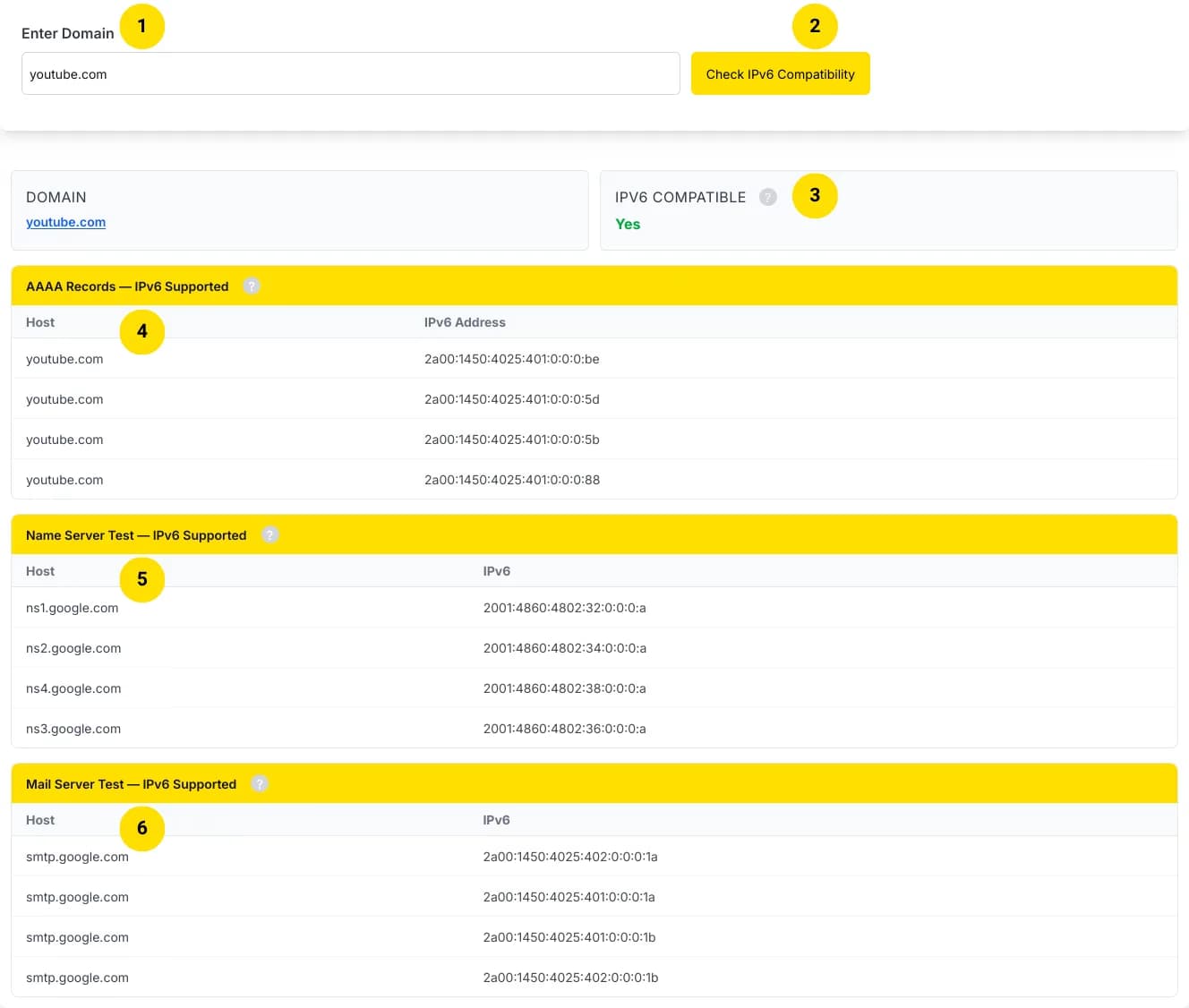
- Enter the Domain in the Input Field Type the bare hostname, for example, github.com or api.example.com, without http://, https://, any path, or query parameters. Subdomains are supported and are treated as independent hostnames in DNS, so they may return completely different results than the root domain.
- Click "Check IPv6 Compatibility" The tool performs three simultaneous DNS lookups against the domain's authoritative nameservers and returns live results. There is no cache layer. You are seeing the current state of the domain's DNS zone.
- Read the Verdict at the Top The IPv6 Compatible field gives you the headline result. "Yes" means at least one valid AAAA record exists for the domain, and it is reachable over IPv6. "No" means the domain resolves over IPv4 only.
- Inspect the AAAA Records Table This section shows the IPv6 addresses published directly for the domain. Multiple records here indicate load balancing or CDN distribution. An empty table tells you that adding AAAA records is the first task in any IPv6 migration for this domain.
- Review the Name Server Test Table Check whether the authoritative nameservers for the domain also have AAAA records. If this table is empty while the AAAA Records table is populated, the website itself is IPv6-reachable, but DNS resolution may fail for clients on IPv6-only networks that cannot reach an IPv4-only nameserver.
- Review the Mail Server Test Table Check whether the domain's MX servers publish AAAA records. This is especially relevant for mail administrators verifying that inbound email delivery works correctly for IPv6-only senders.
Use all Three Tables Together for a Complete Readiness Assessment
True IPv6 readiness means AAAA records exist across all three layers: the website, its nameservers, and its mail servers. A "Yes" verdict with empty NS and MX tables indicates partial readiness.
Use Cases
Confirm AAAA Record Propagation after DNS Changes
When you publish new AAAA records, DNS propagation can take anywhere from minutes to 48 hours depending on the TTL of the previous records. Use this tool to verify that the records are live and visible from the public internet without waiting for propagation to complete elsewhere.
Audit Client and Vendor Domains for IPv6 Readiness
Agencies, managed service providers, and procurement teams can quickly verify whether the domains they manage or partner with are IPv6-ready. Running a domain through this checker takes five seconds and gives you the details you need for a compliance or audit report.
Diagnose Connectivity Failures from IPv6-only Clients
If users on mobile carriers, enterprise VPNs, or IPv6-only networks report that they cannot reach a site, the first diagnostic step is verifying whether the domain publishes AAAA records at all. This tool gives you the answer without needing access to the server or the hosting environment.
Check nameserver IPv6 Support before DNS Migration
Before migrating a domain to a new DNS provider, verify that the new provider's nameservers have their own AAAA records. The Name Server Test table will immediately flag any IPv4-only nameservers that could cause resolution failures for IPv6-only clients after the migration.
Verify Mail Server IPv6 Support for Email Deliverability
Mail administrators can use the Mail Server Test table to confirm that MX records resolve to AAAA addresses, ensuring reliable email delivery to and from IPv6-only mail infrastructure.
Competitive and Industry Research
Researchers, SEO practitioners, and infrastructure analysts tracking IPv6 adoption can audit domains across an industry to benchmark who has made the transition and who has not.
Pre-launch IPv6 Readiness Checks
Before a new domain goes live, run it through this IPv6 site checker to verify that AAAA records are in place, so the site is reachable by the broadest possible audience from day one \u2014 including the growing share of mobile users on IPv6-native carrier networks.
Education and Hands-on Learning
dig or configure a local DNS resolver.FAQs
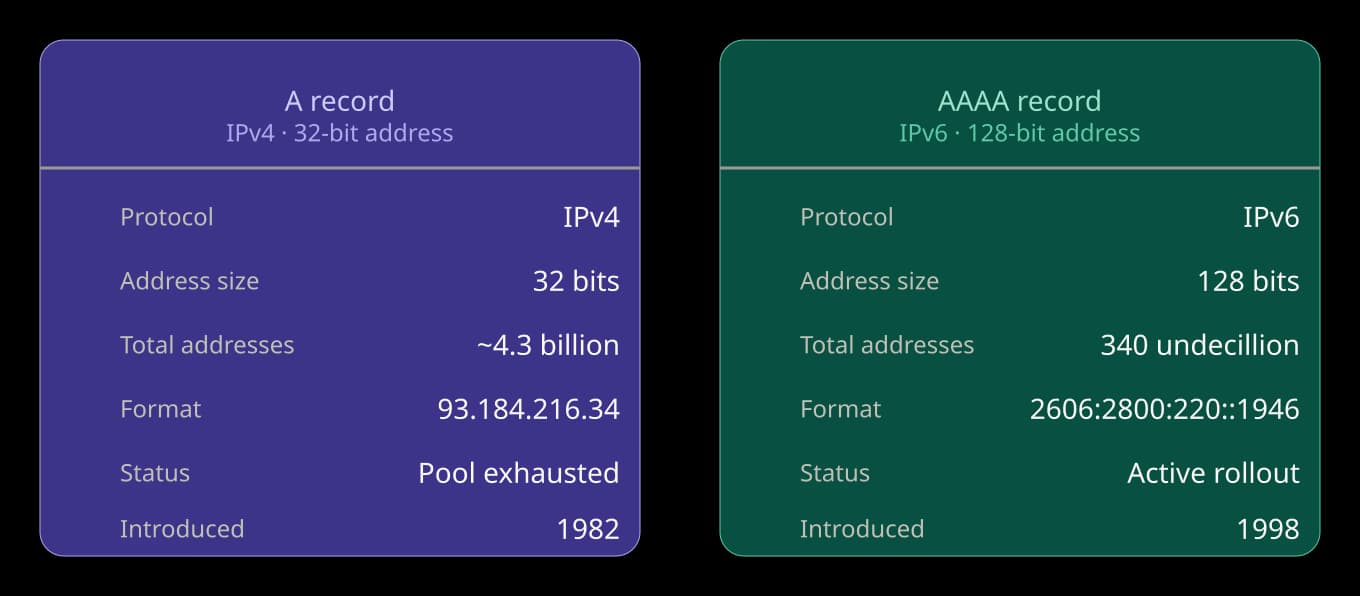
An AAAA record maps a domain name to a 128-bit IPv6 address. It is the IPv6 equivalent of the A record, which maps to a 32-bit IPv4 address. A domain needs at least one AAAA record for IPv6-connected clients to be able to resolve and reach it. To see how an IPv4 address is written in IPv6 notation, use the IPv4 to IPv6 Converter.
We also offer
ASN Lookup
DNSSEC Checker
Domain Age Checker
Bulk Domain to IP Lookup
HSTS Checker
IP to Domain Lookup
SSL Certificate Finder
User Agent Parser
VPN & Proxy IP Detection
Reverse CNAME Lookup
stagingReverse NS Lookup
stagingReverse IP Lookup
stagingReverse Whois Lookup
stagingReverse Domain Lookup
stagingExplore more tools available on our platform.