IP Subnet Calculator for IPv4 and IPv6
Every network, whether it's a home router, a corporate datacentre, or a cloud VPC, is built on subnets. Designing those subnets correctly means knowing exactly where one network ends and another begins - and that requires accurate subnet math. This IP subnet calculator handles that math for you, instantly, for both IPv4 and IPv6.
IPv4 Subnet Calculator
Select the Subnet
Network Class
Enter IPv4 Address
IPv6 Subnet Calculator
Enter IPv6 Address
Enter any IP address, a CIDR prefix or subnet mask, and the tool returns a complete subnet breakdown: network address, broadcast address, usable host range, total hosts, wildcard mask, IP class, address type, and full binary representations. No formulas, no reference tables, no manual bit-shifting. You get clean, accurate results in seconds.
/0 to /128 and identifies the address type automatically, from Global Unicast to Link-Local to Loopback.Whether you're a network engineer planning infrastructure, a developer configuring cloud subnets, a student studying for CCNA or CompTIA Network+, or a sysadmin troubleshooting a connectivity issue, this online IP subnet calculator gives you the complete subnet detail you need, without any guesswork.
What Would You Get from This Tool?
The tool has two independent sections - one for IPv4 and one for IPv6. Each returns a targeted set of fields based on how that version of IP addressing works.
IPv4 Results
192.168.0.0/24 or using a subnet mask and IP address like 255.255.255.0 and 192.168.0.0 - the IPv4 subnet calculator returns:- IP Address: The network IP address you entered, displayed exactly as provided.
- Network Address: The base address of the subnet. This is the identifier for the network itself and cannot be assigned to any device.
- Usable IP Range: The full range of IP addresses within the subnet that can be assigned to hosts.
- Broadcast Address: The last address in the subnet, reserved for sending packets to every host on the network simultaneously.
- First Usable Host Address: The first IP address in the range that can be assigned to a device (one above the network address).
- Last Usable Host Address: The last IP address that can be assigned to a device (one below the broadcast address).
- Total Hosts: The total number of IP addresses in the subnet, including the reserved network and broadcast addresses.
- Total Usable Hosts: The count of IP addresses available for devices. This is Total Hosts minus 2 except for CIDR with prefix length of
31and32. - Subnet Mask: The dotted-decimal mask that defines the boundary between the network and host portions of the address (e.g.,
255.255.255.0). - Wildcard Mask: The bitwise inverse of the subnet mask, used in ACLs and routing protocol configurations.
- CIDR Notation: The address expressed in Classless Inter-Domain Routing format (e.g.,
192.168.0.0/24). - IP Class: The traditional address class (A, B, or C) based on the address's first octet.
- IP Type: Whether the address is Public (internet-routable) or Private (reserved for internal networks).
The tool also returns four binary representations at the bottom of the IPv4 results for these fields:
- IP Address
- Network Address
- Subnet Mask
- Broadcast Address
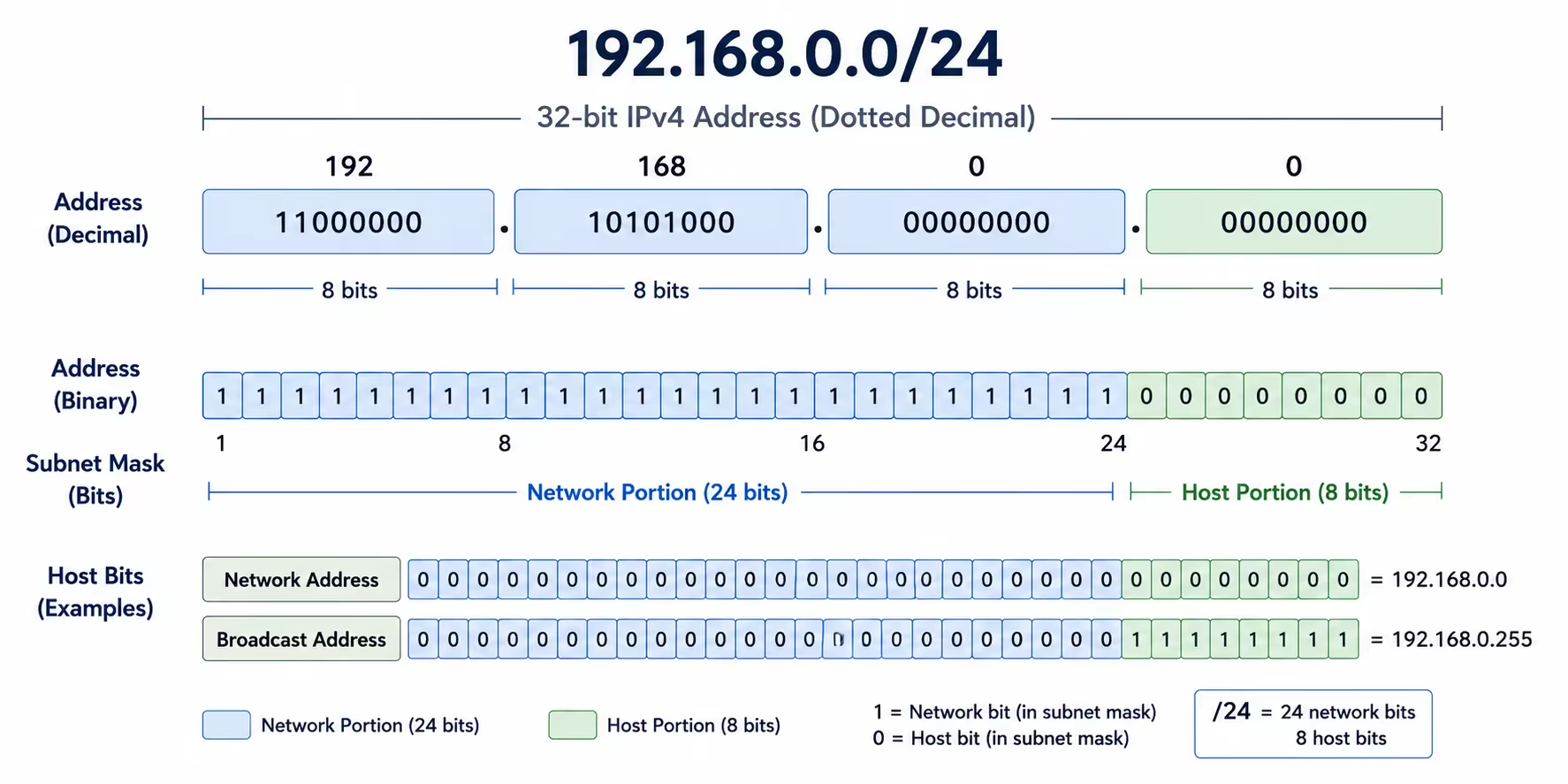
These make it easy to see at the bit level exactly how the subnet mask divides the address into its network and host portions.
IPv6 Results
:: with prefix /64, the tool returns:- IP Address: The full expanded IPv6 address in 8-group hexadecimal format.
- Network Address: The base address of the IPv6 subnet, with all host bits set to zero.
- Usable IP Range: The start and end of the address range within the subnet.
- First Usable Host Address: The first address in the subnet available for assignment.
- Last Usable Host Address: The last address in the subnet available for assignment.
- Total Addresses: The total number of IPv6 addresses the subnet contains. Even a
/64holds over 18 quintillion addresses. - CIDR Notation: The full expanded IPv6 address written with its prefix length.
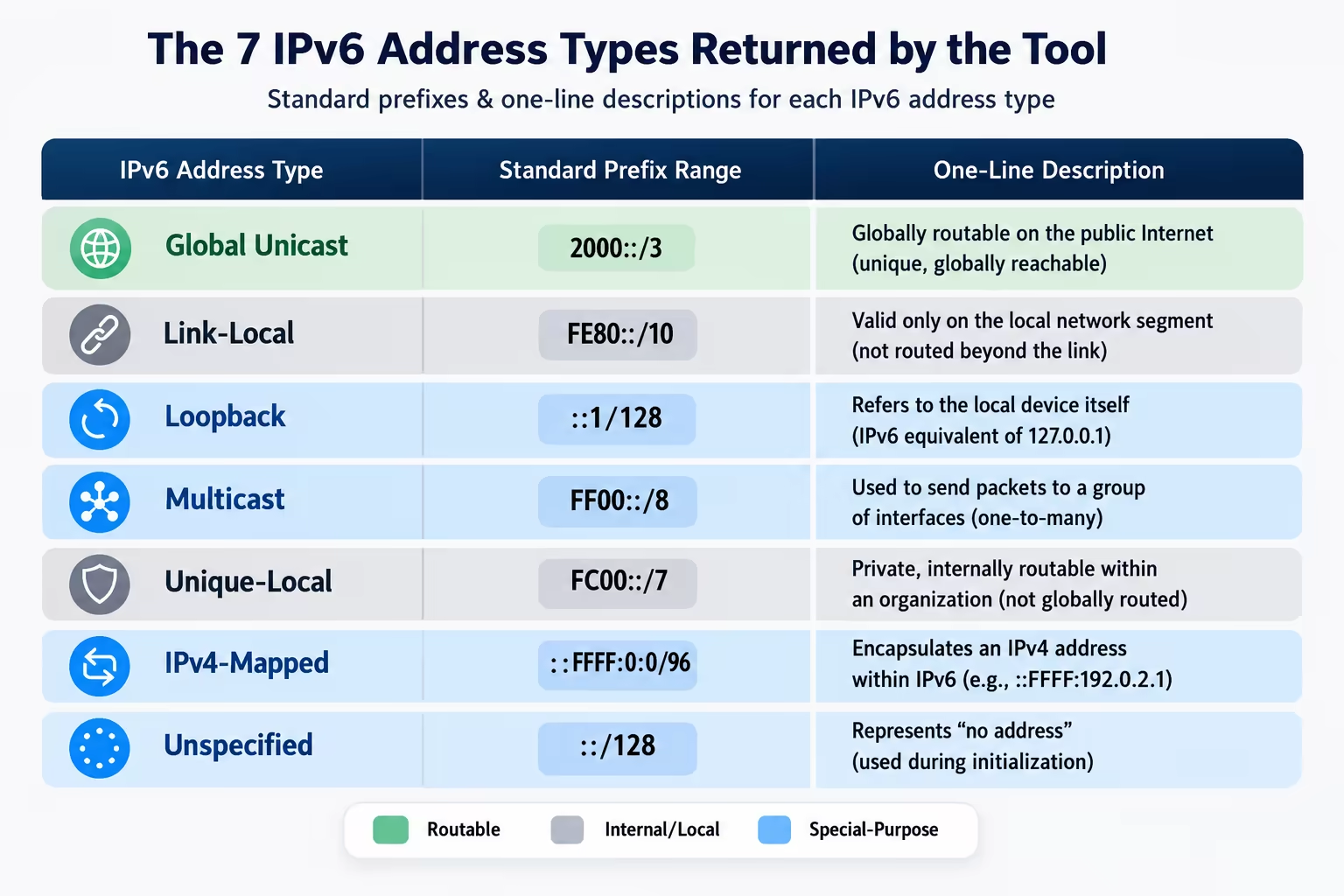
- IP Type: The functional category of the IPv6 address. Possible values include
Global Unicast,Link-Local,Loopback,Multicast,Unique-Local,IPv4-Mapped, andUnspecified.
How to Use This Tool?
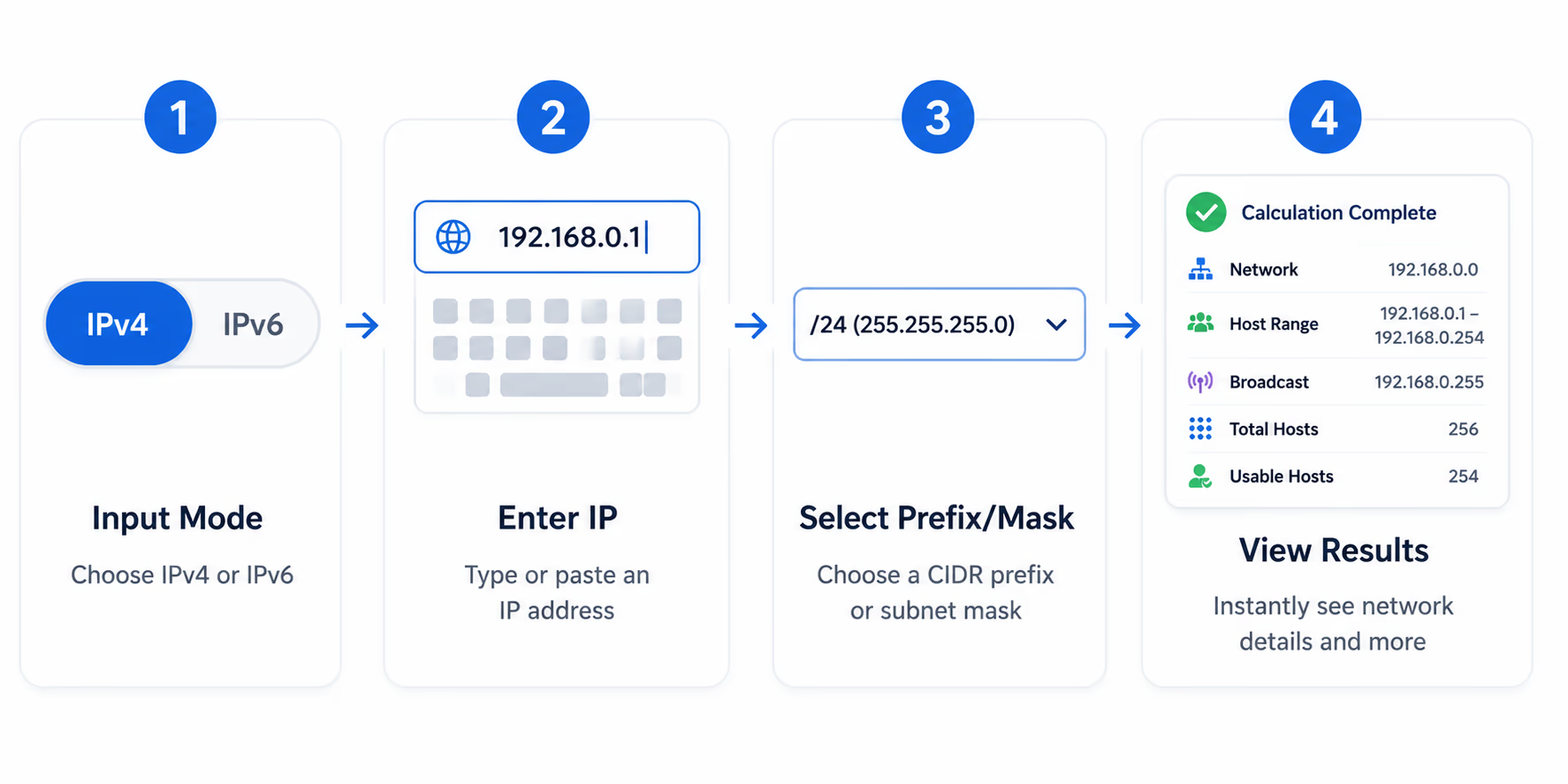
The calculator has separate input panels for IPv4 and IPv6. Here's how to use each.
For IPv4:
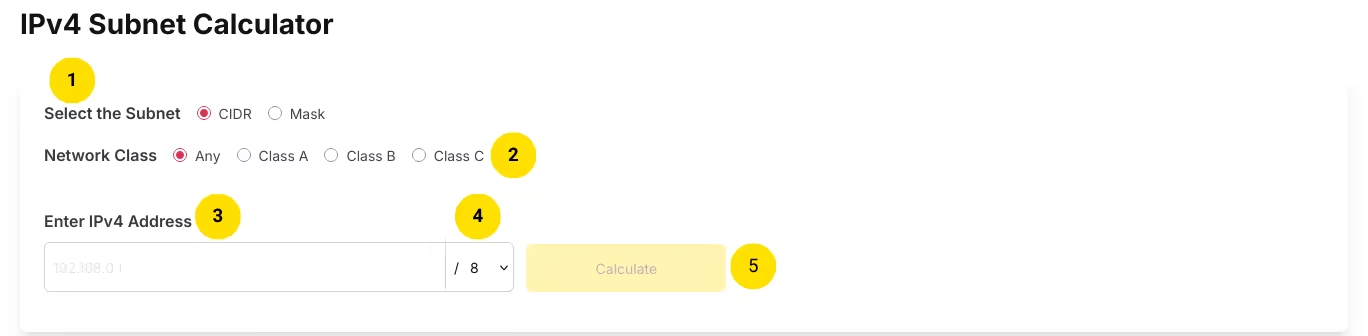
- Choose Your Input ModeAt the top of the IPv4 section, toggle between CIDR and Mask input. Use CIDR if you already know your prefix length (e.g.,
/24). Use Mask if you're working from a subnet mask (e.g.,255.255.255.0). - Select a Network Class (optional)Use the Network Class toggles to filter prefix options to those that belong to Class A (
/8range), Class B (/16range), or Class C (/24range). Leave it on Any if you want access to all prefix lengths from/1to/32. - Enter Your Network IP AddressType the base network address into the text input. For example,
192.168.0.0. - Set Your Prefix Length or Subnet Mask
- In the CIDR mode, select the prefix length from the dropdown (
/1-/32). - In the Mask mode, select a valid subnet mask from the dropdown (e.g.,
255.255.255.0 /24). The mask dropdown only shows valid subnet masks, so you can't accidentally enter an invalid value.
- In the CIDR mode, select the prefix length from the dropdown (
- Click CalculateThe tool immediately returns the full subnet breakdown, including binary representations at the bottom.
For IPv6:

- Enter the network IP addressType your IPv6 address into the input field. You can use shorthand notation, for example
::for the all-zeros address, or2001:db8::for a documentation prefix. - Select the prefix lengthUse the dropdown to choose the CIDR prefix length
0-128. The standard for most IPv6 subnets is/64. - Click CalculateThe tool returns the network address, usable IP range, total address count, CIDR notation, and IPv6 address type.
Use Cases
Plan Network Design and IP Address Assignment
Before assigning IP addresses to any segment like offices, VLANs, server farms, or IoT clusters, the administrators use a subnet calculator to determine exactly how many hosts each subnet can support and what the network boundaries are. This tool gives you the network address, broadcast address, and usable range instantly, so you can plan your address space without spreadsheets.
Cloud Infrastructure Configuration
When provisioning subnets inside AWS VPCs, Azure VNets, or Google Cloud VPCs, you need to enter the exact network address, prefix length, and sometimes the subnet mask into the configuration interface. This IP address subnet calculator confirms those values before you commit them, preventing misconfiguration that can knock services offline.
Firewall Rules and Access Control Lists
Cisco ACLs, Juniper firewall filters, and many other security platforms use wildcard masks rather than subnet masks to define address ranges. Instead of computing the wildcard mask manually, enter your subnet here and copy the Wildcard Mask field directly into your ACL.
Subnet Troubleshooting
When two hosts on the same switch fail to communicate, the first diagnostic step is confirming they're on the same subnet. Enter each host's IP address with its prefix length and compare the Network Address field. If they differ, those hosts are on separate subnets and need routing between them, not a switching fix.
Certification Exam Preparation
CCNA, CompTIA Network+, and similar certification exams test subnetting heavily and under time pressure. Use this subnet mask calculator to check your work and validate your manual calculations. The binary representations at the bottom of the IPv4 results are especially useful for understanding how masking works at the bit level before an exam.
IPv6 Transition and Deployment
Global Unicast address, a Link-Local address, a Unique-Local range, or a Multicast block, without memorizing prefix tables.Security Assessments and Penetration Testing
Penetration testers and security auditors use subnet information to define the scope of network scans and confirm which IP ranges belong to specific network segments. This online IP subnet calculator makes it quick to parse any CIDR block and establish boundaries before running enumeration tools.
Teaching and Learning Subnetting
Instructors and students working through IPv4 subnetting concepts use the binary representation section to visualize exactly how the subnet mask separates the network bits from the host bits. The Class filter also reinforces the relationship between classful addressing and CIDR that is a common source of confusion in networking courses.
Edge Cases
Difference Between Total Hosts & Usable Hosts for IPv4
2^(32 - prefix) - 2, because the network and broadcast addresses cannot be assigned. But there are two special cases:- 31-bit subnet masks (
/31) for point-to-point links may treat both addresses as usable (RFC 3021). - 32-bit subnet masks (
/32) represent a single host.
Broadcast Address in IPv6
Unlike unicast, multicast, and broadcast types of addresses in IPv4, IPv6 supports unicast, multicast, and anycast addresses. There is no broadcast address space in IPv6. Broadcast functionality in IPv6 is implemented using multicast addressing to groups of devices. A multicast group to which all nodes belong can be used for broadcasting in a network, which reduces network traffic compared to IPv4 broadcast storms.
Wildcard Mask and Subnet Mask in IPv4
/24 prefix length, the subnet mask is 255.255.255.0 and the wildcard mask is 0.0.0.255 - each is the bitwise inverse of the other.FAQs
192.168.1.0/24 means the first 24 bits of the address represent the network, and the remaining 8 bits are available for hosts. CIDR replaced the older Class A/B/C system to allow more flexible and efficient use of IP address space.255.255.255.0 means the first three octets identify the network, and the last octet identifies the individual host.1.0.0.0-126.255.255.255, Class B covers 128.0.0.0-191.255.255.255, and Class C covers 192.0.0.0-223.255.255.255 IP addresses. Selecting a class in the filter restricts the prefix length or mask dropdown to options that are conventional for that class, which helps reduce mistakes when you already know which class your network belongs to. Leaving it on Any gives you full access to all valid prefixes.2000::/3) are publicly routable on the internet, equivalent to public IPv4 addresses. Link-Local addresses (fe80::/10) are valid only within a single network segment and are never routed. Loopback (::1/128) is the local loopback address. Multicast (ff00::/8) is used for one-to-many communication. Unique-Local (fc00::/7) is roughly equivalent to private IPv4 ranges. IPv4-Mapped addresses represent IPv4 addresses within the IPv6 space. Unspecified (::) is used as a placeholder when no address has been assigned yet.10.x.x.x, 172.16.x.x-172.31.x.x, and 192.168.x.x) are reserved for use within internal networks and are not routable on the public internet. Public IP addresses are globally routable and assigned by internet authorities. The tool identifies which type your entered address falls under.10.0.0.0/8, 172.16.0.0/12, 192.168.0.0/16). The IP Type field will identify private addresses accordingly. For IPv6, Unique-Local addresses (fc00::/7) serve a similar function to private IPv4 ranges./1 to /32. For IPv6, prefix lengths range from /0 to /128. The /0 prefix covers the entire address space, while /128 identifies a single specific address in IPv6.255.255.255.0 is identical to /24. In the IPv4 section, choose Mask mode to enter a subnet mask or CIDR mode to enter a prefix length; either way the results return both the CIDR Notation and Subnet Mask fields, so you can read the conversion straight off the output. The reference table below lists the common mask to CIDR pairings./1 to /32, so you can calculate each variable-length block - its host count, range, and boundaries - individually as you build a VLSM plan. It does not auto-allocate a full addressing scheme; you size each subnet and the tool confirms its exact boundaries.Common IPv4 CIDR Prefixes
| CIDR | Subnet Mask | Wildcard Mask | Total Addresses | Usable Hosts |
|---|---|---|---|---|
| /8 | 255.0.0.0 | 0.255.255.255 | 16,777,216 | 16,777,214 |
| /16 | 255.255.0.0 | 0.0.255.255 | 65,536 | 65,534 |
| /20 | 255.255.240.0 | 0.0.15.255 | 4,096 | 4,094 |
| /22 | 255.255.252.0 | 0.0.3.255 | 1,024 | 1,022 |
| /23 | 255.255.254.0 | 0.0.1.255 | 512 | 510 |
| /24 | 255.255.255.0 | 0.0.0.255 | 256 | 254 |
| /25 | 255.255.255.128 | 0.0.0.127 | 128 | 126 |
| /26 | 255.255.255.192 | 0.0.0.63 | 64 | 62 |
| /27 | 255.255.255.224 | 0.0.0.31 | 32 | 30 |
| /28 | 255.255.255.240 | 0.0.0.15 | 16 | 14 |
| /29 | 255.255.255.248 | 0.0.0.7 | 8 | 6 |
| /30 | 255.255.255.252 | 0.0.0.3 | 4 | 2 |
| /31 | 255.255.255.254 | 0.0.0.1 | 2 | 2 (RFC 3021, point-to-point) |
| /32 | 255.255.255.255 | 0.0.0.0 | 1 | 1 (single host) |